

How I Use Claude Code to Vibe Code My Designs
And why the design system is the most important thing a designer can own right now.

The Question I Keep Coming Back To
AI can generate UI. AI can write code. So... what’s left for us?
I don’t think this is a rhetorical question. I think it’s one of the most honest things we can ask ourselves right now. And I don’t have a perfect answer. But I’ve been doing enough experiments to have a working theory.
Two Worlds, One Visible Gap
Right now, there are two workflows that are getting a lot of attention:
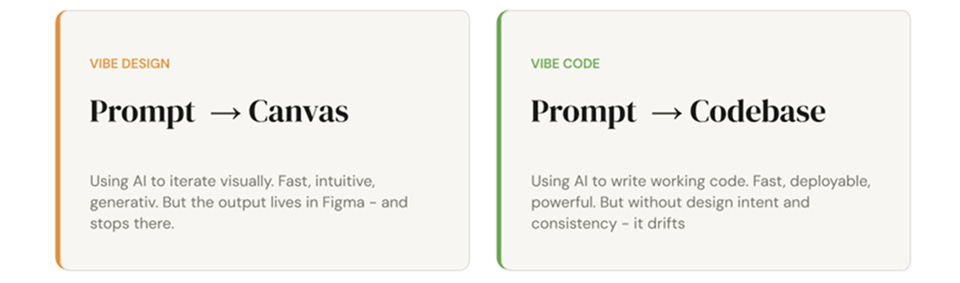
Vibe Design : Prompt → Canvas. Using AI to iterate visually. It’s fast, intuitive, and generative. The output lives in Figma, and honestly? It feels magical.
Vibe Code : Prompt → Codebase. Using AI to write working code. Deployable, powerful, and getting better every week.
Here’s the problem: these two worlds don’t talk to each other very well. Without a shared layer of truth between them, you end up with fast slop on both ends. The design drifts from the code. The code drifts from the intent. And nobody’s happy.
The design system is how you prevent that.
The Design System Is the Bridge
In an AI-native workflow, the design system isn’t just a library of components. It’s the artifact that can translate between the canvas and the codebase. It carries your intent. It structures your decisions. It gives AI agents something to actually work with, instead of guessing.
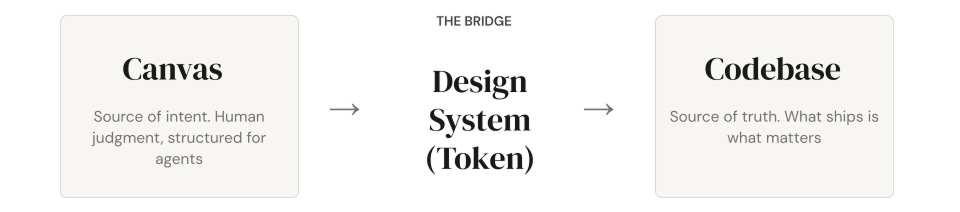
That makes it the highest-leverage thing a designer can own right now.
The canvas is where human judgment lives where you explore and make decisions. The codebase is where those decisions actually ship. The design system (specifically, the token layer) is what connects them. Without it, both sides produce output that looks fast but feels incoherent.
So I Asked Claude to Help Me Build One
I ran a full experiment. I asked Claude:
“What is the optimal approach and project structure for building a complete design system with shadcn/ui components, customized with a unique theme (i.e liquid glass) The objective is to achieve both vibe coding (Claude generating production-ready code) and vibe design (Claude and Figma Console MCP creating mockups in Figma).”
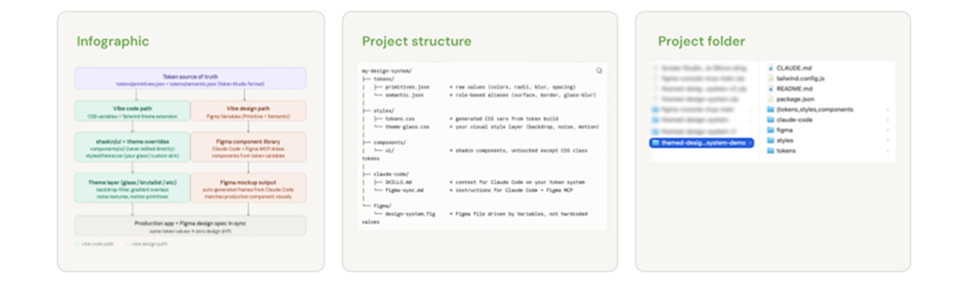
What came out was a full project structure. Not perfect, but a really solid starting point. And that’s the whole point: AI gets you 80% of the way there faster than you’d expect. Your job as a designer is to bring the other 20%.
The Setup: Figma Console MCP
This part surprised me. TJ Pitre built an MCP that creates real parity between your Figma files and your code. The setup has three steps:
Get your Figma token: this is how AI gets permission to look at your files
Configure your MCP client: this tells AI how to behave inside Figma
Connect to Figma Desktop: this is the important one, because it’s what allows the AI to actually write and draw inside Figma. (Funny part, I spent a half hour to figure out where is the manifest file, and it turned out that I forgot to download the repo to import the bridge plugin to Figma)
Once it’s running, it’s kind of wild. The AI isn’t just reading your designs, it’s participating in them.
Vibe Design in the Canvas
With everything set up, the design workflow looks like this:
Create/Generate your design tokens in Figma
This one is straight forward, just ask Claude:
Prompt: Generate the design tokens page in Figma by using primitives.JSON and semantics.JSON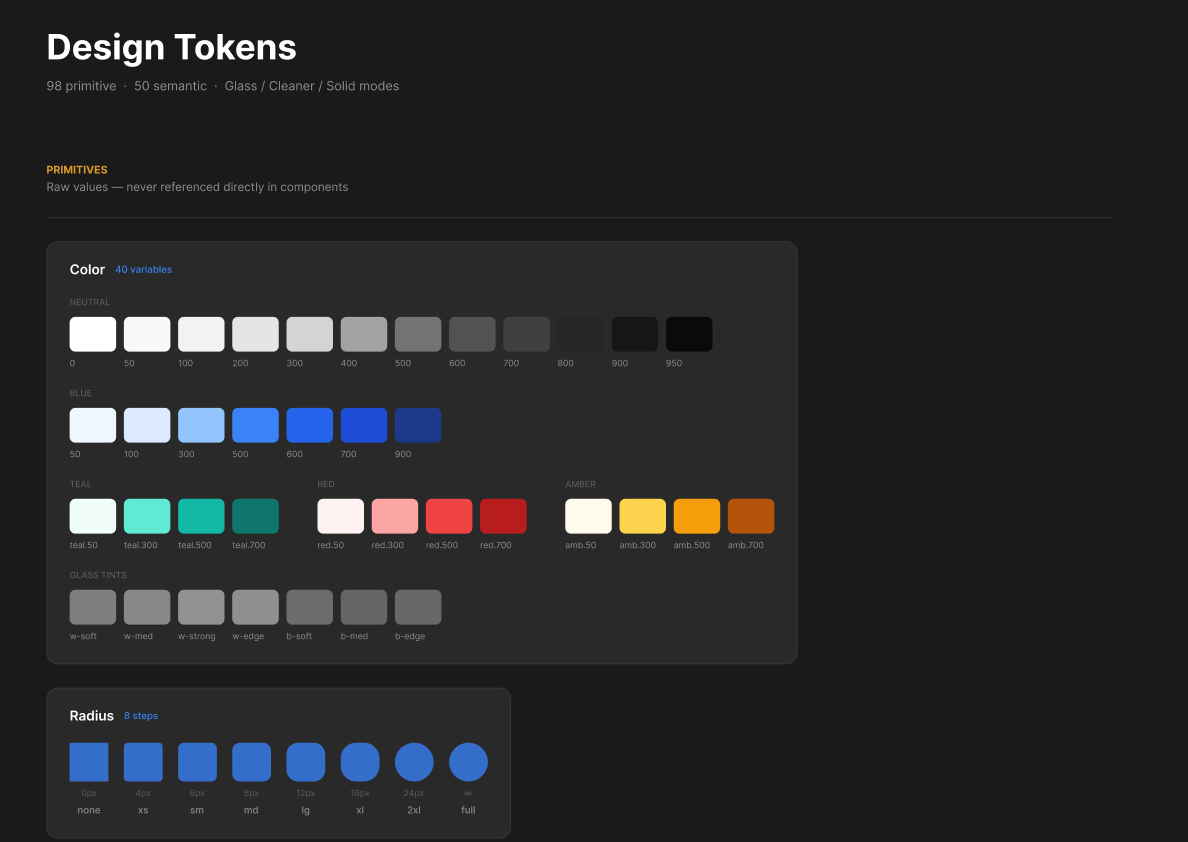
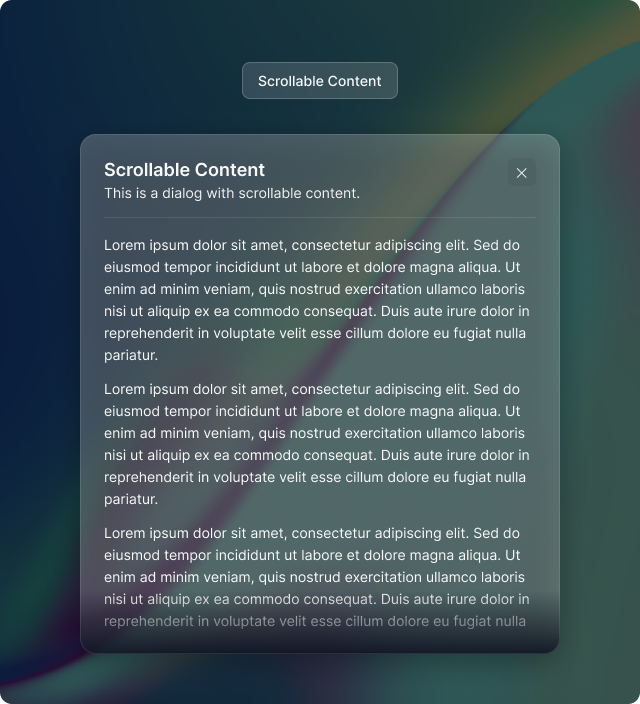
Build a shadcn component with your custom theme
Pick one or many component from shadcn and convert into your own theme, here I picked the scrollable content. it took around 2 mins to build
Generate different variants and iterate fast
This is the fun part, and it might be one of the funniest part of this workflow, generate different variants or even the edgecases.
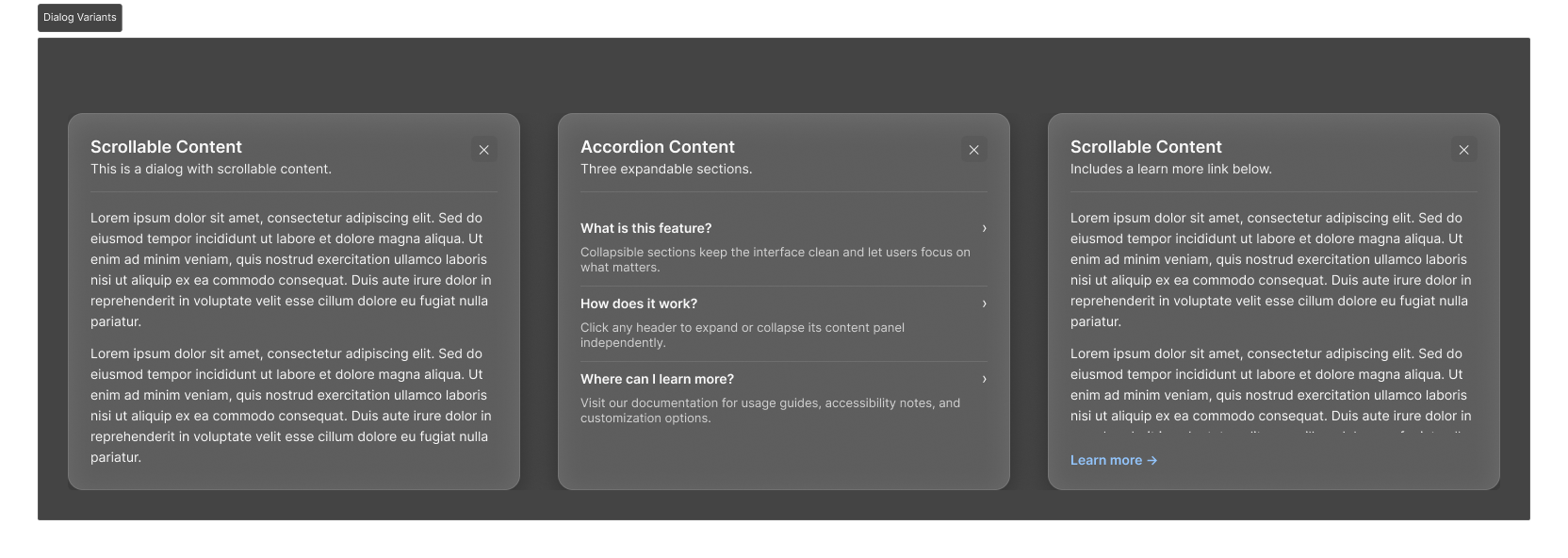
Things that used to take a few hours now take minutes. And this is important, the quality of what comes out depends almost entirely on the quality of what you put in. Your token structure, your logic, your intent. AI is amplifying your thinking, not replacing it.
Vibe Code Your Component
Once the design direction is clear, the code side follows the same pattern:
Design to code: the MCP translates what you’ve built in Figma into working component code
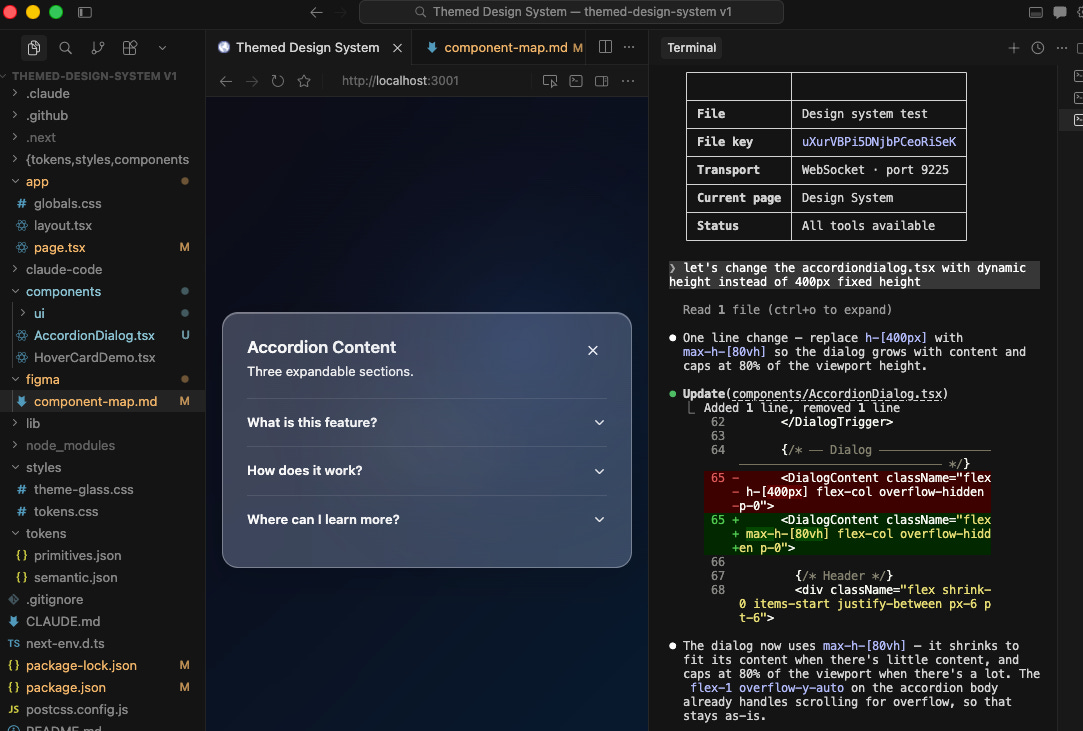
I started with the accordion one because it seems to have more to play around.
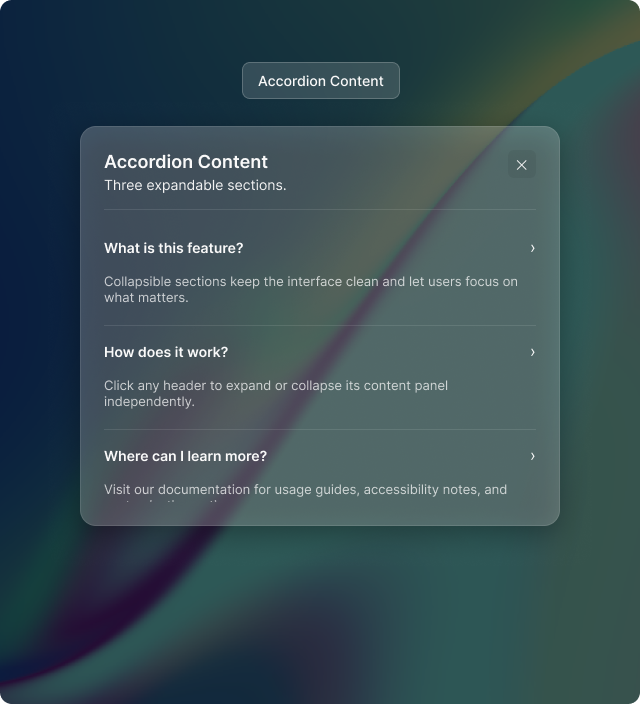
Iterate on behavior: this is where you define how things move, respond, and interact
Claude managed to do the 95% of what I asked, but the less 5% still required some manual tweak, so I asked Claude to fix the height of the dialog. And it works, this is the moment I felt like “Wow, I’m becoming a builder of component now“
If you want, where is the place you can add your personal touch. I’ve been using 21st.dev for inspiration here, and it’s genuinely great for pushing components further
The thing I kept noticing is that the more opinionated you are in the design phase, the better the code comes out. Vague design intent produces vague code. Precise design intent produces precise code.
Two Tools That Changed How I Work With Agents
Beyond the main workflow, two tools came up again and again during the talk.
Skill Creator: Instead of explaining your design system to Claude at the start of every session, you build it once as a “skill.” The agent carries your standards, your decisions, your way of working. It’s like giving Claude a proper brief instead of starting from scratch every time.
Ask User Questions: Instead of getting generic output, the agent asks clarifying questions first. Like a good designer who reads the brief before opening Figma, it gathers context before it generates. This alone has dramatically improved the quality of what I get out of Claude.
If you haven’t tried either of these, start there.
What Designers Still Need to Own
This is the part I care about most.
AI is fast. AI is cheap. AI is getting better at an uncomfortable rate. But there are three things it still can’t replace:
Context: the situational knowledge that only comes from being a human who’s worked on real products with real constraints and real users.
Intent: the why behind decision. Not just “this button is blue” but “this button is blue because we’re trying to build trust at a moment of anxiety.”
Constraint: the edges that keep a system coherent at scale. Anyone can generate components. Fewer people know how to make those components still make sense six months and a hundred iterations later.
The way I think about it now: designers are becoming context architects. We’re not just making things. We’re packaging human judgment into a form that agents can actually use.
What I Actually Learned From This Exercise
A few honest takeaways from doing this in public:
Figma wasn’t built natively for AI. Even with the power of Claude behind it, it consumes significantly more tokens than other toolings like Pencil or Paper. If you’re running experiments, factor that in.
Engineering literacy matters, even for non-technical designers. I still struggle with a lot of the terminology. I’m not saying we all need to become developers. But we need to be building the literacy as we go. The more I understand about how the code side works, the better I get at designing for it.
The question isn’t which tool is best right now. The landscape is going to keep shifting. It was shifting before this talk, and it’ll be shifting by the time you finish reading this. Your job isn’t to keep up with every release. It’s to keep asking the right questions.
Every tool worth adopting should do at least one of three things: make your thinking sharper, make your output better, or make your feedback loop faster. If it doesn’t do any of those, skip it. Seriously.
Outro
I don’t know where all of this lands, exactly. I’m figuring it out alongside everyone else.
But I do know this: the designers who are going to thrive in this next chapter aren’t necessarily the ones who become the most technical. They’re the ones who get really, really good at structuring their thinking, and then packaging that thinking in a way that agents can carry forward.
The canvas still matters. The craft still matters. Your judgment still matters.
AI just gives you a faster way to test whether that judgment is any good.
The more opinionated you are in the design phase, the better the code output. Claude isn't good at deciding what the system should feel like, but once that decision is made and encoded in a design system, it executes reliably. The failure mode is almost always vague briefs, not bad code generation. The people getting the most out of it treat the design system as a communication layer between human taste and AI execution. Precision moves upstream into the decision-making, not the implementation.
interesting !